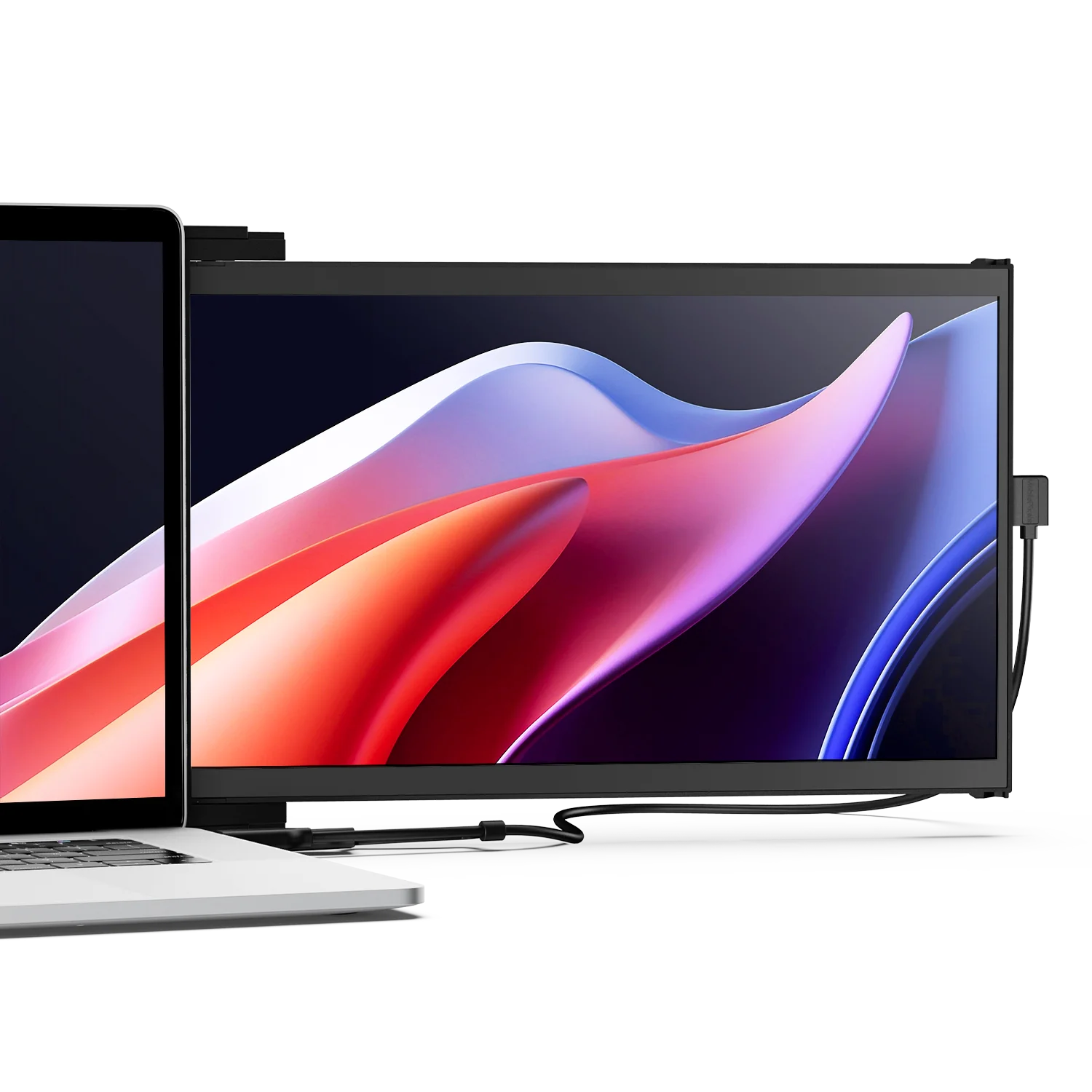
I have watched the portable monitor category grow up over the last few years, and it has split cleanly into two camps. One sells you a slab of screen with a folio case that you prop next to your laptop. The other tries to make the second screen part of the laptop itself. Mobile Pixels has always belonged to the second camp, and the Duex DS Series is the current expression of that idea.
It lists at $269.99 for the 14.1-inch Duex Max DS, reduced from $299.99, with the 13.3-inch Duex Plus DS at $229.99. That is real money for a secondary display, so let us be precise about what the specification does and does not tell you.

The specification, as listed
| Models | Duex Max DS (14.1-inch), Duex Plus DS (13.3-inch) |
|---|---|
| Price | $269.99 (was $299.99) · $229.99 |
| Display modes | Landscape, Portrait, Kickstand, Presentation |
| Rotation | G-sensor auto-rotation |
| Materials | PC-ABS plastic with aluminium alloy |
| Inputs | USB-C and Mini HDMI — hybrid signal |
| Drivers | None required |
| Mounting | Magnetic and sliding attachment to the laptop lid |
| Compatibility | Laptops, Nintendo Switch, Samsung DeX-supported devices |
What the Duex DS gets right
The sliding mount is the entire product
A folio-stand portable monitor occupies desk space next to your laptop and needs a flat surface. The Duex slides out from behind the lid, which means it works on an aircraft tray table, a train seat, or a hotel bed — the environments where a second screen is genuinely hardest to arrange and most valuable to have. If that describes your working life, this design solves a problem the flat-stand competitors simply do not address.
Four modes, and the useful ones are real
Landscape and Portrait cover the standard cases, with a G-sensor handling rotation automatically so you are not digging through display settings. Presentation mode — flipping the panel to face the person across the table — is the one that earns its place in client meetings. Kickstand mode detaches the screen from the laptop-mounted workflow when you want it standing on its own.
Hybrid signal input is a meaningful compatibility hedge
Offering both USB-C and Mini HDMI matters more than it sounds. A single USB-C connection is elegant when your laptop supports DisplayPort Alt Mode, but plenty of work-issued machines and older hardware do not. Having HDMI as a fallback means the monitor is not dead weight on the wrong laptop. Mobile Pixels also states no drivers or software are required, which removes the most common failure point on locked-down corporate machines.
Nintendo Switch and Samsung DeX support
Explicitly listing Switch and DeX compatibility is a nice acknowledgement that this thing has a life outside spreadsheets.

Where I have real reservations
1. There are no display specifications at all
This is my biggest issue and it is not a small one. The product listing describes modes, materials, mounting and compatibility — and never states the resolution, the brightness in nits, the refresh rate, the panel type, or the colour gamut. For a $269.99 monitor, those are the five numbers that determine whether it is pleasant to use. Brightness in particular matters enormously for a screen designed to be used on planes and in cafés, where you are fighting ambient light. Buying a display without knowing its resolution or brightness is not a reasonable ask, and I would want those figures confirmed before ordering.
2. No published weight
A screen that hangs off your laptop lid puts a cantilevered load on the hinge. Weight is therefore the second most important specification for this specific product category, and it is absent. Laptop hinges are not designed for permanent additional mass, and the lighter the panel, the less you should worry.
3. The magnetic mount changes your laptop
Magnetic and sliding attachment implies mounting hardware on the back of your laptop lid. That is a semi-permanent modification to a device you may be leasing from an employer or intending to resell, and it means the monitor is effectively paired to one machine rather than shared across your devices.
4. It costs more than a good desktop monitor
$269.99 buys a very respectable 27-inch 1440p desktop display. You are paying a substantial portability premium for a 14.1-inch panel, which is defensible if you genuinely work on the move — and hard to justify if the honest answer is that it will live on your desk.
Who this is for
- Consultants and frequent flyers. The sliding mount is designed for tray tables and cramped seats, and nothing else in the category does it as well.
- People stuck on a single-screen work laptop. Especially with locked-down IT, since no drivers are required.
- Anyone who presents across a table. Presentation mode is genuinely useful, not a spec-sheet filler.
- Switch and DeX users. Listed compatibility, not guesswork.
Who should skip it
- Anyone doing colour-critical work. With no published gamut or panel type, do not assume this is suitable for photo or video grading.
- Desk-bound users. A conventional monitor gives you far more screen per dollar.
- People who switch laptops often. The mount pairs it to one machine.
- Anyone unwilling to buy a display sight-unseen. Get the resolution and brightness figures first.
Verdict
Mobile Pixels understands the actual problem better than most of its competitors. The sliding attachment, four display modes, hybrid USB-C and Mini HDMI input, and driver-free operation add up to a coherent product for people who work in seats rather than at desks. The current $269.99 price on the 14.1-inch model, down from $299.99, is the most attractive it has looked.
What holds me back from an unqualified recommendation is the information gap. A display listing that omits resolution, brightness, refresh rate and weight is asking you to trust it on the four specifications that matter most. If you are buying primarily for the mounting mechanism — and that is a legitimate reason — the Duex DS delivers. If you are buying primarily for screen quality, get those numbers in writing first.
Both sizes and current pricing are listed on the Mobile Pixels store, and our Mobile Pixels store page tracks their other live offers.
Disclosure: this article contains affiliate links. If you buy through them we may earn a commission at no additional cost to you. All specifications and prices were taken from the manufacturer product listing at the time of writing and may change.